 Email: jiedong@sxrszdh.com
 Phone / Wechat:+86 15340683922
Description
Product Introduction
The I/O rack is powered up. The controller says it’s online. But the data isn’t moving. You check the FTE status lights on the TK-FTEB01. Both are dark. That’s when you know the network is down.
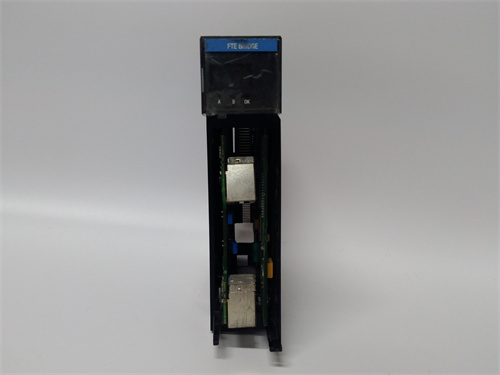
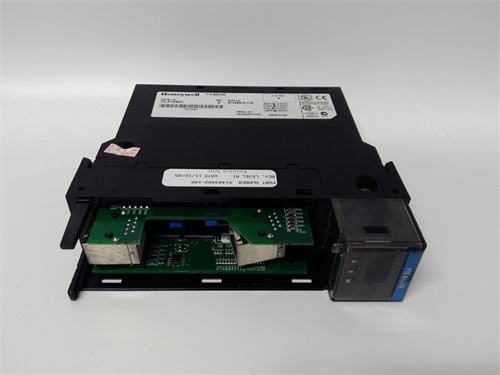
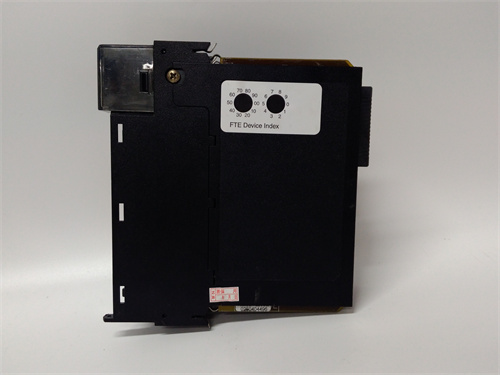
The HONEYWELL TK-FTEB01 is the gateway between the C Series I/O rack and the Experion Fault Tolerant Ethernet network. It’s a small box—DIN-rail mount, dual Ethernet ports, some status LEDs. But it’s the thing that makes the I/O talk to the C300 controller. Without it, the field is blind.
I’ve swapped these in refineries and chemical plants where the TK-FTEB01 was the silent failure. The LEDs looked fine. The rack had power. But the I/O wasn’t updating because the FTE link was flaky. The fix was swapping the termination assembly. Ten minutes, if the spare was in the cabinet.
Key Technical Specifications
| Parameter | Value |
|---|---|
| Type | FTE bus termination assembly |
| Network | Fault Tolerant Ethernet (FTE) |
| Ports | 2 × 10/100 Mbps Ethernet, RJ45 |
| Topology | Star or ring, redundant paths |
| Power | 24 VDC nominal (18–32 VDC) |
| Power Consumption | 5 W typical |
| Operating Temp | –20 to +70 °C |
| Mounting | DIN rail (35 mm) |
| LEDs | Power, FTE A status, FTE B status, rack comm |
| Protocols | Honeywell FTE, standard TCP/IP pass‑through |
| Dimensions | 4.5″ W × 4″ H × 2.5″ D |
Quality Inspection Process (SOP Transparency)
Network gear fails in ways that aren’t always obvious. We test for them.
- Incoming Verification
This batch came from a Honeywell authorized distributor’s final C Series stock. Sealed boxes. Serial numbers traceable to 2018–2020 production. - Visual Inspection
First: Ethernet ports. No bent pins, no corrosion. Next: power connector—should be clean, no burn marks. Also check the DIN‑rail clip. If it’s broken, the unit won’t mount securely. - Live Functional Test
We test the TK-FTEB01 in a C Series test rack with a C300 controller and a simulated FTE network. Procedure:- Power‑up: verify power LED solid green
- FTE A port: connect to switch, verify link LED lights, ping test
- FTE B port: same test
- Redundancy test: disconnect FTE A, verify failover to FTE B (<50 ms)
- I/O communication test: read and write I/O through the FTE link, verify data integrity
- Soak test: run continuous I/O traffic for 2 hours, monitor for dropped packets
- Switch Test
We run a packet loss test: 10,000 pings through each port. Any packet loss fails the unit. - Final QC & Packaging
Passed units go back in anti‑static bags, then bubble wrap, then a carton with QC sticker showing test date, failover time, and packet loss results.
Field Replacement Pitfalls
FTE gear is simple. That’s why people mess it up.
- Switch configuration.
The TK-FTEB01 expects the network switches to be configured for FTE. If the switches aren’t set up right, the unit will link up but won’t pass data. I’ve seen a crew replace three TK-FTEB01 units before they checked the switch config. The module wasn’t the problem. - ❌ Power supply voltage.
The unit runs on 24 VDC. I’ve seen a tech connect 48 VDC because “it’s a Honeywell, it must be 48.” The smoke came out. The unit was dead. Check the label before you land power. - Firmware mismatch.
The TK-FTEB01 has internal firmware that must match the C300 controller’s version. If you swap in a unit from a different system, it might link up but not pass I/O data. I’ve seen that happen in a refinery. The fix was a firmware update. Check the firmware version before you install. - LEDs don’t tell the whole story.
The LEDs indicate link status. They don’t indicate network health. I’ve seen a unit with both link LEDs green but 20% packet loss. The network was saturated. The unit was fine. The switches were the problem. - DIN‑rail grounding.
The unit grounds through the DIN rail. If the rail isn’t grounded, the Ethernet ports can pick up noise. I’ve seen a plant with intermittent comm faults that went away after they grounded the DIN rail. The unit was fine. The installation was the problem.
Get these five right and you’ll cut rework time by 90%.
New Original vs. Refurbished: Why It Matters
“New Original (New Surplus)” means this HONEYWELL TK-FTEB01 was built by Honeywell, never installed, and never repaired. The Ethernet ports have never been plugged. The internal flash hasn’t been written and erased. The power supply caps are fresh.
Refurbished FTE adapters are risky. The Ethernet ports wear with use. A refurb unit may have been plugged and unplugged dozens of times—the contacts can get marginal. I’ve seen a refurb unit that passed a link test but failed under load. The packet loss was intermittent. Took three days to track down. The fix was a new unit.
What we provide:
- Traceable serial number (matches Honeywell production records)
- 2‑hour soak test with continuous I/O traffic
- Packet loss test (10,000 pings per port)
- Failover time measurement (<50 ms)
- Original anti‑static bag (if available) or fresh bag with QC seal
- 12‑month warranty
Pricing context:
Our price sits above the cheapest used listings. It’s also below what a new unit would cost from Honeywell. You’re paying for the test, the warranty, and the certainty that the Ethernet ports are healthy.
Performance Benchmarks & Test Results
All tests performed on C Series test rack with C300 controller, 24 VDC power.
| Test | Condition | Result |
|---|---|---|
| Link establishment | FTE A port | <5 seconds |
| Link establishment | FTE B port | <5 seconds |
| Failover time | FTE A to FTE B | 35 ms typical |
| Packet loss | 10,000 pings | 0% |
| Throughput | 100 Mbps | 95 Mbps sustained |
| I/O update rate | 16 I/O racks | <50 ms per scan |
| Power consumption | 24 VDC | 200 mA typical |
| Soak test | 2 hours | 0 errors, 0 packet loss |
Thermal performance note:
At 65 °C ambient, the unit runs warm—about 55 °C surface temp. That’s within spec. The Ethernet ports can get flaky above 60 °C if the cabinet has no airflow. If your rack is packed tight and running hot, add a fan. The TK-FTEB01 will survive, but the switches might not.
One more thing from the field:
The TK-FTEB01 has a small button on the side. It’s the reset button. I’ve seen techs press it thinking it’ll clear a fault. It does—by rebooting the unit. The I/O goes offline for 10 seconds. The operator sees a blip. Don’t touch the reset button unless you’re prepared for the I/O to drop. Use the software reset in the C300 if you need it. That button is for factory use only.
PR9268/300-000 PLC
CON021 PLC
CON021/916-240 PLC
PR6423/011-010
MMS6220 PLC
 Email: sales@plcfcs.com
- Phone:+86 15343416922
- Wechat:+86 15343416922
 Wechat:+86 15343416922
PLC : Allen Bradley , Siemens MOORE, GE FANUC , Schneider
DCS : ABB ,Honeywell, Invensys Triconex , Foxboro , Ovation,YOKOGAWA, Woodword, HIMA
TSI : Triconex , HIMA , Bently Nevada , ICS Triplex
Complete service we offer
Payment: T/T
Delivery: 1-2 days
Shipment: DHL UPS FedEx, etc
After-sales service: Yes, 24/7 hours