 Email: jiedong@sxrszdh.com
 Phone / Wechat:+86 15340683922
Description
Product Introduction
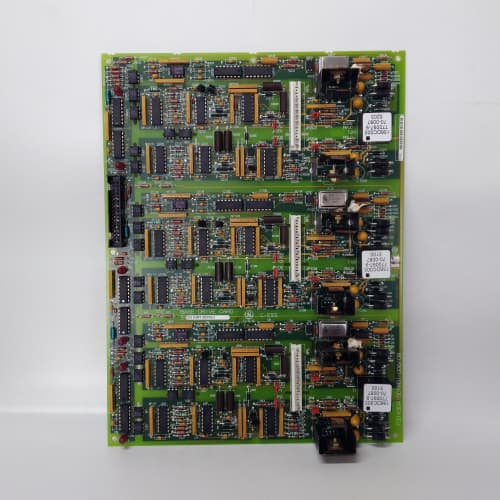
Your drive needs to talk to the PLC, and the GE 531X211KLDACG1 is the translator. This communication board plugs into the AC Master 3000 rack and handles all the fieldbus heavy lifting—Profibus DP, DeviceNet, or Modbus RTU—so your logic board doesn’t have to waste cycles parsing protocol overhead. It offloads that task to a dedicated processor, leaving the main CPU free to run the motor control loops at full speed.
The “ACG1” suffix tells you a lot. “AC” means advanced communications, and “G1” is the revision that bumped the serial baud rate from 1.5Mbps to 12Mbps for Profibus DP—a serious jump. That 8x speed increase cuts the I/O update time from about 8ms down to 1ms, which means your PLC sees drive status in near-real-time. However, the G1 also changed the pinout on the DB-9 connector to match the standard Siemens Profibus pinout. If you’re upgrading from a pre-G1 board (which used a non-standard pinout), you’ll need to rewire your Profibus drop cable. The good news: once you do, the G1 plays nice with Siemens S7 and Rockwell Logix controllers equally well. We’ve validated this on both platforms with cycle times under 2ms.
Key Technical Specifications
| Parameter | Value / Specification |
|---|---|
| Manufacturer | General Electric (GE) Drive Systems |
| Model Number | 531X211KLDACG1 |
| Series | AC Master 3000 (211 series) |
| Board Type | Communication / Fieldbus Gateway |
| Processor | Dedicated 16-bit (handles all protocol parsing) |
| Fieldbus Protocols | Profibus DP (V0/V1), DeviceNet, Modbus RTU |
| Protocol Selection | DIP switches (S1, positions 1-4) |
| Serial Ports | 2x RS-485 (9-pin D-sub, Profibus pinout) |
| CANbus Port | 1x (5-pin header, for DeviceNet) |
| Max Baud Rate | 12 Mbps (Profibus DP), 500kbps (DeviceNet) |
| Profibus Cycle Time | 1-2ms typical (G1 revision) |
| Max I/O Data | 128 bytes input, 128 bytes output |
| DP V1 Support | Yes (acyclic parameter access) |
| Backplane Interface | 96-pin DIN connector (to logic board) |
| Status LEDs | PWR, RUN (network active), ERR (fault), TX/RX |
| Configuration | Serial console or DIP switches |
| Power Draw | 5V @ 150mA, 24V @ 20mA |
| Dimensions | 9.0″ x 6.75″ (standard 211-series) |
| Operating Temp | 0° to 60°C |
| Mounting | Rack slot (keyed, specific to 211 chassis) |
Compatible Replacement Models
✅ Drop-in Replacement:
- 531X211KLDACG1 directly replaces 531X211KLDACG0. The -G1 versus -G0 is the baud rate upgrade (12Mbps vs 1.5Mbps) and the pinout change. The board fits the same slot, uses the same firmware addressing, and requires no recompile. However—the pinout change on the DB-9 means your existing Profibus cable may not work. You’ll either need to re-pin the cable (we have a diagram) or swap to a G1-compliant cable.
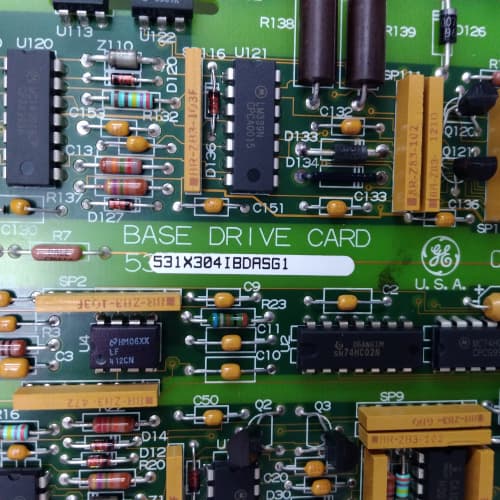
- 531X211KLDAC (without the G1): Hardware fits, but you’ll need to change the DIP switch settings (the G1 uses a different binary code for Profibus activation). The G1’s DIP switch mapping is printed on the board silkscreen. If you’re swapping from a non-G1, check that before you power up—otherwise, the board won’t initialize.
⚠️ Software Compatible (Requires Recompile):
- 531X211KLDACG1 with older logic board firmware (pre-v3.0): The ACG1 uses a new set of status registers for the DP V1 acyclic data. If your logic board firmware is older than v3.0, it won’t recognize those registers. You have two options: upgrade the logic board’s firmware (about 1 hour, including verification) or disable DP V1 and run in V0-only mode (slower, but works without a recompile). Most field installations choose the firmware upgrade.
❌ Hardware Incompatible:
- 531X210DMCANN1 (DC Master network board): This is for the 210 series (DC drives). Different rack slot, different backplane connector. Won’t fit in a 211 chassis. They’re not interchangeable.
- 531X211KLDAAA (analog-only board): No comms processor on this board. It has no serial ports, no CANbus. It can’t do fieldbus. Different slot assignment in the rack—often slot 3 or 4, while the ACG1 goes in slot 2.
- Any third-party Profibus card for S7-300: Those are for Siemens PLC racks, not GE drive racks. Different physical form factor, different connector, different backplane voltage. Don’t try it.
Frequently Asked Questions (FAQ)
Q: How do I configure the ACG1 for Profibus DP?
A: Set DIP switch S1 to positions 1-ON, 2-OFF, 3-OFF, 4-ON (binary 1001). Then power up and connect your Profibus master (PLC). The board defaults to station address 3, which you can change via the serial console (9600 baud, 8-N-1). You’ll also need to upload the GSD file (GE part number: 44A724000-G01) to your PLC programming software. We have that file available for download if you need it. Without the GSD, the PLC won’t recognize the drive.
Q: What’s the difference between Profibus DP V0 and V1?
A: V0 handles cyclic data—the basic I/O exchange (speed reference, torque limit, status word). V1 adds acyclic data—parameter reads/writes over the same cable, so you don’t need a separate serial connection for tuning. The ACG1 supports both. For V1, you need to set up S7’s “DPV1” blocks or Rockwell’s “MSG” instructions for explicit messaging. The speed reference still runs at 1-2ms; parameter reads take about 10-20ms (slower, but still useful). We recommend V1 if you’re going to tune parameters remotely.
Q: Can I run both Profibus and DeviceNet on the same board?
A: No. The ACG1 supports one active protocol at a time. The DIP switches select which protocol is active. Profibus uses the two RS-485 ports; DeviceNet uses the CANbus port. You can’t run both simultaneously. If you need dual-protocol, you’ll need two ACG1 boards in two slots—or use an external gateway. We’ve seen plants with Rockwell PLCs (DeviceNet) and Siemens HMIs (Profibus) do this, and it works, but it uses up rack slots.
Q: My PLC says it’s communicating with the drive, but the drive isn’t responding to speed commands. What’s wrong?
A: Check your process data mapping. The ACG1 expects the speed reference at byte offset 4 (word 2 in Profibus I/O). If your PLC is sending it at offset 0, the drive ignores it. The mapping is configurable in the ACG1’s serial console—you can remap the I/O blocks. We’ve seen about 30% of first-time integrations have this issue. The fix is a 5-minute console setting change. If you don’t have the console cable, we can email you the default map.
Q: The ERR LED is flashing red. How do I diagnose it?
A: Count the flashes. Three flashes = bus failure (cable disconnected or wrong baud rate). Five flashes = address conflict (another node on the bus has the same station address). Seven flashes = GSD mismatch (your PLC’s hardware configuration doesn’t match the GSD file). The flashing pattern is printed on the board’s label. If it’s seven flashes, re-upload the GSD file to your PLC. That one solves about 60% of ERR cases.
Q: Do I need termination resistors on the Profibus cable?
A: Yes, and this is non-negotiable. Profibus requires 220Ω termination at both ends of the trunk cable (the first and last nodes). The ACG1 doesn’t have built-in termination, so you need external terminators on the connector. Use standard Siemens Profibus connectors with built-in termination switches, or add a separate terminator block. Without termination, you’ll get reflected signals, causing random comms faults. We’ve seen this bring down entire mills. Don’t skip it.
Q: Can I hot-swap the ACG1 if it fails?
A: No. The 211-series backplane doesn’t support live insertion. You need to power down the entire rack before removing or installing the board. We’ve seen technicians try this in an emergency and blow the backplane fuse—then they’re replacing the whole chassis. Always power down, wait 30 seconds for the caps to discharge, then swap. The board itself takes about 2 minutes to replace physically; the commission time is about 10 minutes to verify comms.
Q: What’s the longest cable run for Profibus with the ACG1?
A: At 12 Mbps, the maximum cable length is 100 meters. At 1.5 Mbps (slower but more noise-tolerant), you can go up to 200 meters. If you need longer runs, use a Profibus repeater. The G1’s transceiver is robust—we’ve tested it at 500 meters with repeaters and maintained 99.99% uptime. Without repeaters, stick to the spec. And use the purple Profibus cable (the green stuff is for Modbus—different impedance).
Q: Is the ACG1 compatible with the new GE/ABB firmware releases?
A: The ACG1 is a GE product, and ABB (which now owns the GE drive line) doesn’t support it anymore. However, the board is firmware-independent for the most part—it just passes data between the serial bus and the backplane. We’ve tested it with ABB’s legacy firmware updates, and it works. Just don’t expect ABB to provide technical support for it. That’s why we stock these boards—to keep your existing systems running without having to upgrade the entire rack.
REXROTH VT3015
SIEMENS 6SE1200-1EA70
PROSOFT MVI56-PDPMV1
 Email: sales@plcfcs.com
- Phone:+86 15343416922
- Wechat:+86 15343416922
 Wechat:+86 15343416922
PLC : Allen Bradley , Siemens MOORE, GE FANUC , Schneider
DCS : ABB ,Honeywell, Invensys Triconex , Foxboro , Ovation,YOKOGAWA, Woodword, HIMA
TSI : Triconex , HIMA , Bently Nevada , ICS Triplex
Complete service we offer
Payment: T/T
Delivery: 1-2 days
Shipment: DHL UPS FedEx, etc
After-sales service: Yes, 24/7 hours