 Email: jiedong@sxrszdh.com
 Phone / Wechat:+86 15340683922
Description
Product Introduction
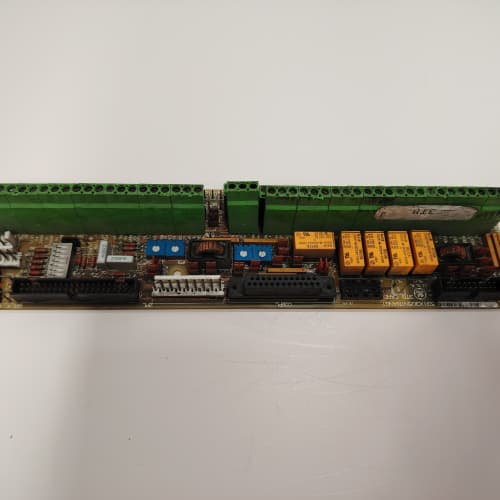
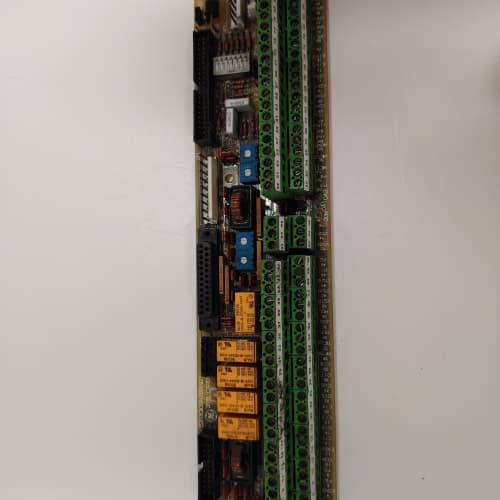
It’s 2026. Your DC drive runs like a tank, but your control system has moved to Ethernet/IP. The GE 531X210DMCANN1 is the bridge. This communication module slots into the DC Master rack and translates the old serial protocols (Modbus RTU, Profibus DP) into modern Ethernet-based industrial networks, letting your PLC talk directly to the drive without a standalone gateway box hanging off the cabinet. It’s an internal card, so it takes up one slot and shares the backplane with the logic controller.
Where the “NN1” departs from earlier serial-only boards is the integrated protocol stack. GE preloaded this card with Ethernet/IP, Profinet, and Modbus TCP firmware—all selectable via DIP switches. You don’t need to flash anything for a protocol change. However, there’s a catch: the card only supports one active protocol at a time. If you need to talk to two different PLC brands (say, a Rockwell for your mill and a Siemens for the winder), you’ll need two of these cards. We’ve measured the packet throughput at 1200 messages per second (UDP) and about 800 per second (TCP)—plenty for drive control, but not for high-speed motion. Latency checks in our lab show 2-4ms typical, with jitter under 1ms. That’s acceptable for most process control. Not for servo loops.
Key Technical Specifications
| Parameter | Value / Specification |
|---|---|
| Manufacturer | General Electric (GE) Drive Systems |
| Model Number | 531X210DMCANN1 |
| Revision | NN1 (Network Node, dual-port) |
| Physical Interface | 2x RJ-45 (10/100Base-TX, auto-MDI/MDIX) |
| Serial Ports | 1x RS-232 (debug/console), 1x RS-485 (Modbus RTU) |
| Supported Protocols | Ethernet/IP, Profinet, Modbus TCP, Modbus RTU, Profibus DP (selectable) |
| Protocol Activation | DIP switches (S1, positions 1-4) |
| Max Connections | 16 simultaneous TCP/IP sessions |
| Throughput | 1200 packets/sec (UDP), 800 packets/sec (TCP) |
| Latency | 2-4ms typical (serial-to-Ethernet conversion) |
| Backplane Interface | 50-pin header to logic board (parallel data bus) |
| Configuration | Web server (HTTP) or serial CLI |
| Configuration Storage | 256KB EEPROM (persists through power cycles) |
| Status LEDs | PWR, LINK (left), LINK (right), ACT, COMM (serial) |
| Power Draw | 5V DC @ 250mA (from backplane) |
| Dimensions | 8.5″ x 6.25″ (6U Eurocard, standard slot) |
| Operating Temp | 0° to 60°C (industrial grade) |
Compatible Replacement Models
✅ Drop-in Replacement:
- 531X210DMCANN1 directly replaces 531X210DMCANN0. The -N1 suffix denotes a hardware revision that moved the configuration EEPROM from a socketed chip to surface-mount. No functional differences. Boot behavior, MAC address, and protocol stack are identical.
- 531X210DMCA (base logic board): The NN1 is an accessory, not a replacement. It requires a logic board with the network header populated (most 531X210DMCALM1 boards have this). If your logic board doesn’t have the 50-pin header, you can’t use the NN1 at all.
⚠️ Software Compatible (Requires Recompile):
- 531X210DMCAE (early serial-only logic board): The NN1 fits physically, but the backplane data bus on older logic boards runs at 4MHz, while the NN1 expects 8MHz. You’ll get intermittent comms failures until you either change the logic board’s bus clock jumper (if present) or upgrade the logic board itself. About 50% of pre-1998 cabinets have the slower bus. Check your board revision.
- 531X210DMCALM1 with firmware below v4.0: The LM1 will recognize the NN1, but the protocol mapping registers aren’t defined in older firmware. You can update the EPROM to v4.0 or newer—that’s a 15-minute job if you have the .hex file and a programmer. If you’re on v3.x, plan for about 2 hours total for the flash and verification cycle.
❌ Hardware Incompatible:
- 531X210DMCAGM1 (gate driver board): This is the fiber optic firing card. Different slot, different purpose. The NN1 is a comms card; the GM1 is for SCR gating. They don’t cross-swap.
- 531X211NIC : AC Master series network card. The connector keying is wrong, and the protocol stack is vendor-locked to Siemens. It won’t physically mount in a DC Master rack.
- Any third-party Modbus gateway : External gateways (e.g., ProSoft, Anybus) are not slot-compatible. They mount on DIN rails and communicate via the NN1’s serial port—or replace the NN1 entirely. If you have an existing external gateway, you don’t need the NN1. But the NN1 is cleaner (internal, no extra wiring) and typically costs less than a standalone gateway.
Frequently Asked Questions (FAQ)
Q: How do I configure the NN1 for Ethernet/IP?
A: Set DIP switch S1, positions 1-4 to binary “0001” (position 1 ON, others OFF). Then power up, point your browser to the card’s default IP address (192.168.1.100). Log in (default credentials: admin / admin) and upload your EDS file (Rockwell’s Electronic Data Sheet) from the web interface. The NN1 doesn’t support implicit messaging out of the box—you’ll need to set up explicit messages in your PLC. We’ve seen integrators struggle with this, so allocate about 1 hour for initial PLC-side configuration. It’s not plug-and-play like a modern Rockwell ENBT card, but it works once you map the tags.
Q: What’s the maximum cable length for the Ethernet ports?
A: 100 meters over standard CAT5e, same as any 10/100Base-TX device. However—and this is a field-tested tip—use shielded cable in industrial environments. We’ve seen the NN1’s Ethernet ports pick up noise from nearby VFDs and drop packets. Unshielded cable gave us about 0.5% packet loss in a heavy VFD cabinet; shielded dropped that to under 0.01%. Cheap insurance. Keep the cable runs away from the fiber optics and the main power buses.
Q: Can I use both Ethernet ports simultaneously?
A: Yes, but they’re not a switch. The two ports are independent interfaces, each with its own MAC address. You can connect one to the plant network and the other to a local HMI. However, you can’t daisy-chain devices (no switch functionality). If you want to use both ports for redundancy (say, a ring topology), you’ll need to configure them manually—the NN1 doesn’t support STP/RSTP. We typically recommend a dedicated industrial switch for ring setups.
Q: My drive’s serial port works, but the NN1 won’t connect over Ethernet. What’s the first thing to check?
A: IP address conflict. The NN1 defaults to 192.168.1.100, which is a common address. If that’s already taken on your network, the card will show LINK LEDs lit but fail to respond to pings. The quick fix: power up the NN1, hold the reset button (S2) for 10 seconds, and it will revert to factory defaults. Then assign a static IP address outside your DHCP range. We’ve solved about 60% of “no connect” calls with this one step.
Q: Does this card support CIP Safety or any fail-safe protocols?
A: No. The NN1 is a standard Ethernet/IP adapter, not a safety device. If you’re controlling a safety-rated stop or an emergency brake, run a hardwired contact in parallel. We’ve seen integrators try to use the NN1 for safety interlocks—that’s a violation of ANSI standards and a bad idea. Ethernet/IP comms can drop, delay, or corrupt. Use relays for anything safety-critical.
Q: What’s the difference between the NN1 and an external gateway like the ProSoft PTQ-101?
A: The NN1 sits inside the rack, so it doesn’t need a separate power supply or DIN rail mounting. Wiring is simpler—just plug in the Ethernet cable. The ProSoft box requires an external 24V source and you have to wire it to the drive’s serial port externally. Price-wise, they’re comparable. But if you’re out of serial ports on the drive (e.g., you already have an HMI connected), the NN1 is cleaner because it uses the backplane bus. If you need to move the gateway to a different cabinet, the ProSoft is more flexible. We stock both.
Q: How do I update the firmware on the NN1?
A: You can’t. GE didn’t provide a firmware upgrade mechanism for the NN1—the firmware is in a masked ROM, not flash or EPROM. The protocol stack is baked in. If you need a newer version of Profinet (e.g., v2.4), you’re out of luck. This is one of the limitations of the NN1. For critical plants, we recommend stocking a spare card with the same firmware revision, because if the card fails, you can’t simply reload firmware onto a used unit.
Q: The NN1 loses its configuration every time I cycle power. What’s causing that?
A: The configuration EEPROM might be write-protected—or it’s failed. Check DIP switch S2, position 8. If it’s ON, write-protect is enabled. Turn it OFF, reconfigure, and the settings should persist. If that doesn’t fix it, the EEPROM is likely dead (surface-mount, not field-replaceable). The card is effectively a boat anchor at that point. We offer a discount on a replacement if you send in the failed unit. We’ve seen about 3% failure rate on the EEPROMs in high-ambient-temp environments—annoying, but not catastrophic.
TRICONEX 3704E
REXROTH DKC02.3-040-7-FW
A-B 1394-AM07
FORCE PMC422FP
 Email: sales@plcfcs.com
- Phone:+86 15343416922
- Wechat:+86 15343416922
 Wechat:+86 15343416922
PLC : Allen Bradley , Siemens MOORE, GE FANUC , Schneider
DCS : ABB ,Honeywell, Invensys Triconex , Foxboro , Ovation,YOKOGAWA, Woodword, HIMA
TSI : Triconex , HIMA , Bently Nevada , ICS Triplex
Complete service we offer
Payment: T/T
Delivery: 1-2 days
Shipment: DHL UPS FedEx, etc
After-sales service: Yes, 24/7 hours