
 Email: jiedong@sxrszdh.com
 Phone / Wechat:+86 15340683922
Description
Product Description
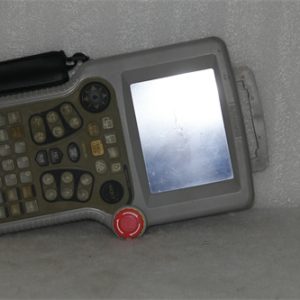
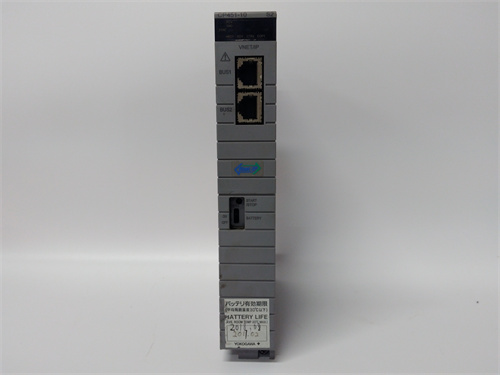
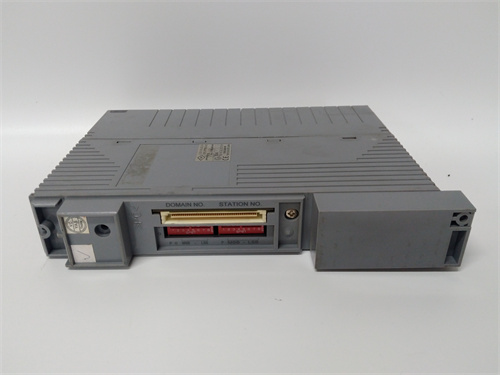
YASKAWA CP451-10-S2 is a high-performance industrial touch panel HMI (Human-Machine Interface) from Yaskawa’s Cockpit series, designed to serve as the central visualization and control hub for Yaskawa PLCs, servo drives, and motion controllers in automation systems. As a key component of Yaskawa’s integrated automation ecosystem, YASKAWA CP451-10-S2 features a 10.1-inch widescreen TFT LCD display with multi-touch functionality, enabling intuitive operation and real-time monitoring of production processes. Unlike generic HMIs, YASKAWA CP451-10-S2 is factory-optimized for seamless communication with Yaskawa’s MP series motion controllers and Sigma-7 servo systems, supporting direct data exchange without additional gateways [Product Link: Please supplement], where you can access the HMI’s communication protocol manual and screen design guide. In practical applications, YASKAWA CP451-10-S2 is deployed in packaging machinery control, robotic cell operation, and conveyor system monitoring, working alongside Yaskawa’s PLCs to provide operators with clear process visualization and quick fault diagnosis. Additionally, YASKAWA CP451-10-S2 boasts a rugged IP65 front-panel protection rating, wide operating temperature range, and support for Yaskawa’s CockpitDesigner software, making it suitable for harsh industrial environments and customizable to specific application needs.
Product Parameters
| Parameter Category | Specific Specifications |
|---|---|
| HMI Type | Cockpit series 10.1-inch widescreen touch panel |
| Display | 10.1-inch TFT LCD, 1280×800 resolution (WXGA), 500 cd/m² brightness, 1000:1 contrast |
| Touch Technology | Projected capacitive multi-touch (2 points), scratch-resistant glass panel |
| Communication Interfaces | Ethernet (10/100/1000 Mbps), USB 2.0 (host/device), RS-232/RS-485, HDMI output |
| Supported Protocols | Modbus TCP/RTU, Ethernet/IP, PROFINET, Yaskawa MC protocol (for MP controllers) |
| Memory | 1 GB DDR3 RAM, 4 GB flash memory (expandable via microSD card up to 32 GB) |
| Operating System | Windows Embedded Compact 7 |
| Programming Software | Yaskawa CockpitDesigner (compatible with IEC 61131-3) |
| Operating Temperature | 0°C ~ 50°C (operation), -20°C ~ 60°C (storage) |
| Protection Grade | IP65 (front panel), IP20 (rear panel) |
| Power Supply | 24 VDC ±10% (1.5 A typical consumption) |
| Compatibility | Yaskawa MP2000/3000 motion controllers, Sigma-7 servo drives, MLX series PLCs |
| Certification | CE, UL 508, cULus, RoHS, FCC Part 15 |
| Dimensions (L×W×H) | 272 mm × 182 mm × 45 mm (without mounting kit) |
| Weight | 1.2 kg |
Advantages and Features
- Intuitive Multi-Touch Operation: YASKAWA CP451-10-S2’s 10.1-inch WXGA multi-touch display enables easy navigation of complex HMI screens, reducing operator training time and improving workflow efficiency.
- Seamless Yaskawa Ecosystem Integration: Native support for Yaskawa’s MC protocol and direct communication with Sigma-7 servo drives/MP controllers eliminate compatibility issues and simplify system setup.
- Rugged Industrial Design: IP65 front-panel protection against dust and water spray, combined with a wide operating temperature range, ensures reliable performance in harsh manufacturing environments (e.g., food processing, automotive assembly).
- Rich Communication Options: Gigabit Ethernet, USB, and serial interfaces support connection to multiple controllers and third-party devices, making YASKAWA CP451-10-S2 a flexible hub for mixed automation systems.
- Customizable Visualization: Yaskawa’s CockpitDesigner software allows for drag-and-drop screen creation, support for dynamic graphics, and real-time data logging, enabling tailored HMI interfaces for specific applications.
- HDMI Output Capability: The built-in HDMI port enables extended display to external monitors, ideal for large-scale production lines where multiple operators need access to process data.
Application Fields and Cases
Core Application Fields
- Packaging Industry: Filling machine process visualization, labeling machine parameter adjustment
- Robotics Industry: Collaborative robot cell control, pick-and-place system monitoring
- Automotive Industry: Assembly line conveyor control, welding robot status display
- Food & Beverage Industry: Bottling line speed regulation, packaging quality inspection data visualization
Typical Application Case
In a Japanese food and beverage manufacturer’s bottling line automation project, the plant deployed YASKAWA CP451-10-S2 HMIs to monitor and control 12 Yaskawa Sigma-7 servo-driven filling machines and MLX series PLCs. YASKAWA CP451-10-S2 provided real-time visualization of fill levels, line speed, and fault alerts, with multi-touch controls allowing operators to adjust parameters without stopping production. The HMI’s IP65 front panel withstood frequent washdowns in the food processing environment, and its Ethernet connectivity enabled centralized data logging to the plant’s MES system. YASKAWA CP451-10-S2 reduced operator response time to faults by 40% and improved overall line efficiency by 15%, resulting in annual cost savings of $120,000 [Product Link: Please supplement] (see the project’s efficiency report and HMI screen examples).
Competitor Comparison (vs. Siemens SIMATIC HMI TP1000 Comfort)
| Comparison Dimension | YASKAWA CP451-10-S2 | Siemens SIMATIC HMI TP1000 Comfort |
|---|---|---|
| Display Resolution | 1280×800 (WXGA) | 1024×600 (WSVGA) |
| Touch Technology | Multi-touch (2 points) | Single-touch |
| Protection Grade | IP65 (front) / IP20 (rear) | IP65 (front) / IP20 (rear) |
| Native Ecosystem Support | Yaskawa MP controllers/Sigma-7 drives | Siemens S7 PLCs/SINAMICS drives |
| Communication Interfaces | Gigabit Ethernet, USB 2.0, RS-232/485, HDMI | Fast Ethernet, USB 2.0, RS-232/485 |
| Operating Temperature | 0°C ~ 50°C | 0°C ~ 50°C |
| Cost-Effectiveness | Mid-range (multi-touch + HDMI) | Mid-range (single-touch) |
Selection Suggestions
- Ecosystem Compatibility: Prioritize YASKAWA CP451-10-S2 for existing Yaskawa PLC/servo drive installations to leverage native communication; choose Siemens HMI for Siemens automation systems.
- Touch Function Needs: Select YASKAWA CP451-10-S2 for multi-touch operation requirements; single-touch applications may use cost-effective alternatives.
- Environment Matching: Use YASKAWA CP451-10-S2 in washdown or dusty environments (IP65 front); standard HMIs suffice for clean rooms.
- Display Requirements: Choose YASKAWA CP451-10-S2 for WXGA resolution (1280×800) and HDMI output; lower-resolution displays are suitable for basic monitoring tasks.
- Spare Parts Planning: Reserve one YASKAWA CP451-10-S2 HMI per 8 production lines to ensure quick replacement in case of display or hardware failure.
Precautions
- Mount YASKAWA CP451-10-S2 with the recommended Yaskawa mounting kit to ensure proper ventilation and protection against mechanical damage.
- Use shielded Ethernet cables for communication with controllers to minimize electromagnetic interference, especially in high-noise environments (e.g., near motors or inverters).
- Calibrate the touch screen periodically (every 6 months) using CockpitDesigner software to maintain accurate touch response and prevent operation errors.
- Avoid exposing the HMI to direct sunlight or extreme temperature fluctuations, as this may damage the LCD panel or reduce touch sensitivity.
- Back up HMI configuration data regularly to a microSD card or network drive to enable quick restoration in case of firmware updates or hardware replacement.
- Clean the front panel with a soft, lint-free cloth and mild detergent (avoid abrasive cleaners) to preserve the IP65 protection and scratch-resistant glass.


- CP451-10-S2
IC693CP1363 GE DCS
IC693CPU331 GE
IC693CMM321 GE DCS
IC697CPU772 DCS
IC697MDL750 GE DCS
IC697CP1782 PLC
A02B-0308B52 GE 60
IC693CHS397C
Brand new✔ In stock ✔ Fast shipping✔
PLC : Allen Bradley , Siemens MOORE, GE FANUC , Schneider
DCS : ABB ,Honeywell, Invensys Triconex , Foxboro , Ovation,YOKOGAWA, Woodword, HIMA
TSI : Triconex , HIMA , Bently Nevada , ICS Triplex
Complete service we offer
Payment: T/T
Delivery: 1-2 days
Shipment: DHL UPS FedEx, etc
After-sales service: Yes, 24/7 hours
 Email: sales@plcfcs.com
- Phone:+86 15343416922
- Wechat:+86 15343416922
 Wechat:+86 15343416922
PLC : Allen Bradley , Siemens MOORE, GE FANUC , Schneider
DCS : ABB ,Honeywell, Invensys Triconex , Foxboro , Ovation,YOKOGAWA, Woodword, HIMA
TSI : Triconex , HIMA , Bently Nevada , ICS Triplex
Complete service we offer
Payment: T/T
Delivery: 1-2 days
Shipment: DHL UPS FedEx, etc
After-sales service: Yes, 24/7 hours