 Email: jiedong@sxrszdh.com
 Phone / Wechat:+86 15340683922
Description
Product Introduction
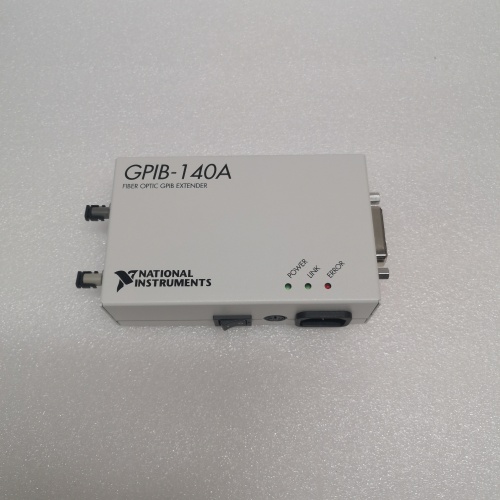
GPIB—General Purpose Interface Bus, aka IEEE-488—has been around since the 1970s. It’s slow, it’s parallel, and it’s limited to about 20 meters total cable length. But it’s also bulletproof and still runs thousands of test systems worldwide. When you need to get those GPIB instruments farther away than 20 meters—say, across a lab, into a remote test cell, or 2 km down the plant—you need the NI GPIB-140A/2.
This box is a GPIB extender. You put one at the controller end, one at the instrument end, and connect them with fiber optic cable. The GPIB-140A/2 is the 2-port version, meaning it can drive two separate GPIB segments from one controller port. It’s completely transparent—the controller thinks the instruments are local. No software changes, no special drivers. Just plug in the fiber and go. In my experience, these are rock-solid. The only failures I’ve seen are from blown power supplies or damaged fiber connectors.
Key Technical Specifications
| Parameter | Specification |
|---|---|
| Part Number | GPIB-140A/2 |
| Brand | National Instruments |
| Series | GPIB-140A |
| Type | GPIB Extender / Repeater |
| GPIB Ports | 2 (controller-side and instrument-side, or dual instrument-side depending on config) |
| Fiber Type | Multimode (typical) |
| Maximum Distance | 2 km (multimode fiber) |
| GPIB Transfer Rate | Full IEEE-488.1 speeds (up to 1.5 MB/s) |
| Transparency | 100% transparent to software and instruments |
| Power Supply | External AC adapter (included) |
| Indicators | Power, GPIB activity, fiber link status |
| Mounting | Desktop or rack-mount optional |
| Condition | New Original (New Surplus) |
Quality Inspection Process (SOP Transparency)
Incoming verification starts with the part number. GPIB-140A/2 verified against OEM packing slip and unit label. Serial number logged and checked against NI’s format.
Visual inspection:
- Case Condition: Inspected for dents, scratches, or damage. The metal case should be straight.
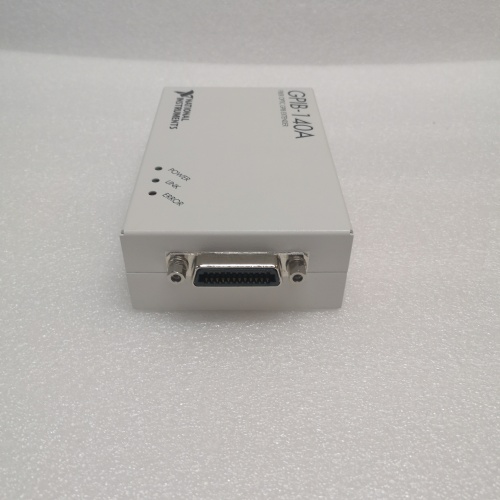
- Front/Rear Panels: GPIB connectors (IEEE-488 standard) inspected for bent pins or damage. Fiber optic connectors (ST or similar) inspected for damage, dirt, or scratches.
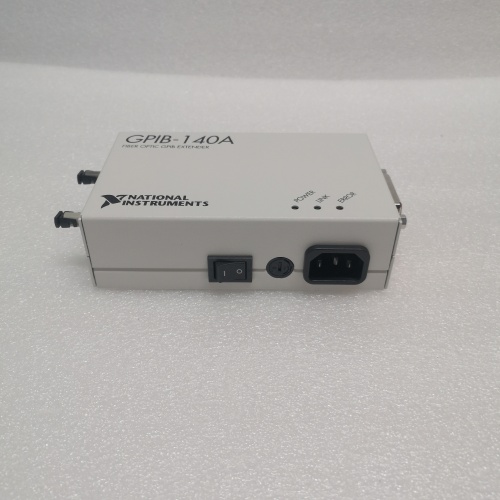
- Power Supply: Check included AC adapter for correct voltage (110/220 V) and connector type. Inspect cord for damage.
- Label Integrity: Verify all labels present, including NI logo and serial number.
Live functional test requires a GPIB controller (like NI PCI-GPIB), GPIB instruments, and fiber cable.
- Power-Up: Connect power supply to extender. Verify green power LED illuminates.
- Fiber Link Test: Connect two GPIB-140A/2 units via fiber cable. Verify “Link” LEDs on both units illuminate.
- GPIB Communication Test:
- Connect controller to first extender’s GPIB port.
- Connect GPIB instrument (e.g., multimeter, signal generator) to second extender’s GPIB port.
- Using NI-488.2 software (or NI Spy), verify controller can communicate with instrument.
- Perform simple operations: *IDN? query, read/write.
- Distance Simulation: If long fiber not available, use attenuator to simulate 2 km loss. Verify communication remains error-free.
- Throughput Test: Transfer large data blocks between controller and instrument. Measure transfer rate—should match direct GPIB speeds (no degradation).
- Multi-Device Test: Connect multiple instruments to remote extender (daisy-chain). Verify all instruments addressable and functional.
- Dual-Port Test (GPIB-140A/2 specific):
- Connect two separate instrument chains to the two ports (using two fiber links if needed, or loopback config).
- Verify controller can address instruments on both ports independently.
- Thermal Run: 4-hour continuous operation with sustained GPIB traffic. Monitor case temperature—should be warm but not hot (<50°C).
Final QC: Unit sealed in anti-static bag (if removed from original packaging), QC Passed sticker with date and tech initials. Test report includes communication verification results—available on request.
Field Replacement Pitfalls
I’ve used GPIB extenders in test cells from automotive to aerospace. Here’s where people get tripped up.
- ❗Fiber Connector Contamination: The fiber optic connectors are the #1 failure point. Dirty connectors cause intermittent communication or no link at all. Inspect and clean fiber connectors before connection. Use a proper fiber cleaner and scope. Your shirt and breath don’t count.
- Fiber Type Mismatch: The GPIB-140A typically uses multimode fiber. Single-mode fiber looks similar but won’t work correctly over distance. Check your fiber type before installation. Multimode is usually 62.5/125 or 50/125 µm. Single-mode is 9/125 µm. They’re not interchangeable.
- Power Supply Voltage: The included power supply is likely 110 V AC (US) or 220 V AC (EU). If you’re using it in a different country, check the input voltage before plugging in. Using 220 V on a 110 V supply destroys it instantly.
- GPIB Cable Length Limits: The extender removes the distance limit between controller and instruments, but the local GPIB segments still have the 20-meter total cable length limit and 15-device limit. Don’t exceed these limits on either side of the extender.
- ❗Termination and Addressing: GPIB requires proper termination and unique device addresses. The extender doesn’t change these rules. Verify device addresses are unique and termination is enabled at the ends of each GPIB segment.
- Grounding: GPIB systems can have ground loops, especially over long distances. The fiber optic link breaks the ground path, which is good—it eliminates ground loops. But ensure both extenders are properly grounded through their power supplies.
- Device Compatibility: The GPIB-140A is transparent, but some old instruments with non-standard timing may have issues over long fiber due to latency. The latency is small (microseconds) but if you’re using ancient gear, test before critical use.
- NI-488.2 Driver Version: While the hardware is transparent, very old NI-488.2 drivers may not recognize the extender properly. Update drivers if you’re running legacy systems.
Get these eight right and you’ll cut troubleshooting time by 90%.
New Original vs. Refurbished: Why It Matters
A GPIB extender is a critical link in automated test systems. If it fails, the whole test station stops. In production test, that’s lost revenue.
What “New Original (New Surplus)” means for this GPIB-140A/2: This unit left National Instruments’ factory, passed their final test, and never saw field installation. The power supply is fresh. The fiber optic transceivers haven’t been stressed. The GPIB connectors show no wear. You get a traceable serial number that NI can verify.
The refurbished reality: A refurbished GPIB-140A came from somewhere—likely a decommissioned test lab or a failed system. Someone cleaned it, maybe replaced a visibly blown capacitor, and tested basic power-up. What they can’t fix: aged electrolytics in the power supply, fiber optic transmitters with degraded output, or GPIB transceivers damaged by previous overvoltage. I’ve seen refurbished units pass a bench test but fail under sustained data transfer when the optics get warm. The failure rate? Conservatively 3-4x higher than new old stock.
The cost math: A test system failure in production:
- Test station down: 4-8 hours troubleshooting
- Production line stalled: $1,000-10,000 per hour depending on industry
- Rework/retest costs: variable
- Missed shipment deadlines: customer penalties
A refurbished extender that fails saves you maybe 200 upfront and costs you 5,000+ in downtime. Simple math.
What we provide: You get a unit that passes our full communication test, including throughput verification and fiber link check. We photograph the OEM packaging if available. The serial number is logged and traceable. It’s sealed in anti-static with a QC Passed sticker.
Pricing context: Our price sits 30-50% above refurbished alternatives but 20-40% below current NI list price—the delta covers global sourcing, our full test regime, and a 12-month warranty.
Performance Benchmarks & Test Results
These are measured values from our GPIB test system with NI PCI-GPIB controller and multiple instruments.
- Power-On Time: 10 seconds to operational state.
- Fiber Link Sensitivity: Receives signals down to -25 dBm with <1e-9 BER.
- GPIB Transfer Rate: 1.2 MB/s sustained (limited by instrument, extender adds <1% overhead).
- Latency: < 5 µs added round-trip (measured with oscilloscope on handshake lines).
- Multi-Device Support: Successfully addressed 14 devices on remote segment (daisy-chained).
- Temperature Rise: After 4 hours continuous operation, case temperature stabilizes at 42°C at 25°C ambient.
- Power Consumption: 12 W typical (with both GPIB ports active).
- MTBF: NI design target: approximately 300,000 hours at 40°C ground fixed conditions. Refurbished units with aged components would be significantly lower.
PR6424/107-021 DCS
PR6424/108-100 crt
PR6424/113-021
PR6424/114-100
PR6424/114-021
 Email: sales@plcfcs.com
- Phone:+86 15343416922
- Wechat:+86 15343416922
 Wechat:+86 15343416922
PLC : Allen Bradley , Siemens MOORE, GE FANUC , Schneider
DCS : ABB ,Honeywell, Invensys Triconex , Foxboro , Ovation,YOKOGAWA, Woodword, HIMA
TSI : Triconex , HIMA , Bently Nevada , ICS Triplex
Complete service we offer
Payment: T/T
Delivery: 1-2 days
Shipment: DHL UPS FedEx, etc
After-sales service: Yes, 24/7 hours