 Email: jiedong@sxrszdh.com
 Phone / Wechat:+86 15340683922
Description
Product Introduction
The robot stops mid‑cycle. The pendant says “System Failure.” The green LED on the DSQC377B is dark. The rest of the cabinet has power. You know what comes next.
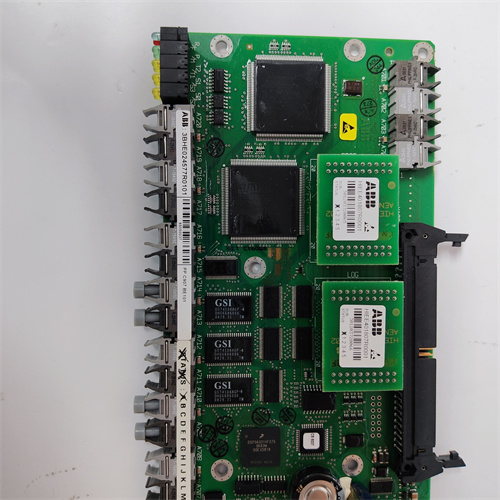
That’s the ABB DSQC377B—the brain inside the IRC5 controller. It runs RobotWare, the operating system that moves the arm. It stores the programs. It talks to the drives. When it dies, the robot becomes a very expensive paperweight.
I’ve swapped these in automotive plants, welding cells, and palletizing lines. The DSQC377B is solid—until it isn’t. I’ve seen them killed by power surges, by a failing CompactFlash card, and by simple old age. The flash memory wears out. The caps dry up. The robot starts throwing random “System Halt” faults. The fix is a board swap. Twenty minutes, if the spare is on the shelf.
Key Technical Specifications
| Parameter | Value |
|---|---|
| Board Type | Main Computer Unit (MCU) |
| Compatibility | IRC5 robot controllers (Single, Dual, Compact) |
| Processor | Intel Celeron M 1.0 GHz |
| Memory | 512 MB DDR RAM |
| Storage | CompactFlash (internal), 2 GB typical |
| Operating System | VxWorks (RobotWare) |
| Communication | 2 × Ethernet (10/100), 2 × USB, RS‑232 |
| I/O | PCI bus to drive units, fieldbus adapters |
| LEDs | Power, run, fault, Ethernet link |
| Power | 24 VDC from controller backplane |
| Operating Temp | 0 to +50 °C |
| Mounting | IRC5 controller card rack |
Quality Inspection Process (SOP Transparency)
This board gets the full treatment. If it fails, the robot stops.
- Incoming Verification
This batch came from an ABB authorized service center surplus. Original anti‑static bags. Serial numbers traceable to 2012–2015 production. - Visual Inspection
First: the edge connector. Gold fingers should be bright, no scoring. Next: the CompactFlash card—check that it’s seated, no bent pins. Also check the electrolytic caps around the power input. Any bulging is a reject. Look for any burn marks near the processor. - Live Functional Test
We test the DSQC377B in a full IRC5 test cabinet with drives and a robot arm. Procedure:- Power‑up: verify all LEDs cycle, board boots to ready
- Ethernet test: ping both ports, verify link
- USB test: read/write to USB drive
- Serial test: loopback on RS‑232 port
- System load: load a known good program, run robot through full motion sequence
- Soak test: run continuous cycle for 2 hours, monitor for faults
- CompactFlash test: write/read test, verify data retention
- Memory Test
Run full RAM diagnostic. Any errors fail the unit. - Final QC & Packaging
Passed boards go back in anti‑static bags, then bubble wrap, then a carton with QC sticker showing test date, firmware version, and soak test results.
Field Replacement Pitfalls
The main computer is the heart of the robot. Mistakes here are expensive.
- CompactFlash failure.
The DSQC377B boots from a CompactFlash card. That card wears out. If the robot boots to a black screen but the power LED is on, the CF card is likely dead. I’ve seen a plant replace the board, keep the old CF card, and get the same failure. The card is part of the system. If it’s old, replace it too. - ❌ Firmware mismatch.
The DSQC377B runs a specific RobotWare version. If you swap in a board from a different robot, the robot may not boot—or it may boot but fault on I/O mismatches. I’ve seen a crew swap a board from an IRB 2600 into an IRB 4600. The robot started but crashed on the first move. Record the RobotWare version before you pull the old board. - Power supply issues.
The DSQC377B runs on 24 V from the controller backplane. If the backplane power supply is failing, the board will act flaky—random reboots, communication dropouts. I’ve seen a plant replace three boards before they checked the backplane voltage. It was 19 V. The boards were fine. - ESD kills.
The board has CMOS logic. A winter day, a dry warehouse, and a tech without a wrist strap can zap an input buffer. I’ve seen a board that passed power‑up but failed the Ethernet test—the port was dead. Wrist strap. Every time. - Parameter backup.
The robot programs and calibration data live on the CompactFlash card. If you swap the board and keep the card, the data is still there. But if you swap the card too, you lose everything. I’ve seen a plant lose a week’s worth of programming because they didn’t back up before the swap. Back up the robot before you touch the board.
Get these five right and you’ll cut rework time by 90%.
New Original vs. Refurbished: Why It Matters
“New Original (New Surplus)” means this ABB DSQC377B was built by ABB, never installed, and never repaired. The CompactFlash card has zero write cycles. The processor hasn’t been thermally cycled. The caps are fresh.
Refurbished robot controller boards are risky. The CompactFlash card is the weak point. A refurb board may have a CF card that’s been written thousands of times—it’s near end‑of‑life. I’ve seen a refurb board that booted fine but failed after three months because the CF card wore out. The robot stopped mid‑shift. The downtime cost was ten times the board price.
What we provide:
- Traceable serial number (matches ABB production records)
- 2‑hour soak test with full motion cycle
- Ethernet, USB, serial port verification
- CompactFlash read/write test (with fresh card if needed)
- RAM diagnostic
- Original anti‑static bag (if available) or fresh bag with QC seal
- 12‑month warranty
Pricing context:
Our price sits above the cheapest used listings. It’s also below what a new board would cost if ABB still made them. You’re paying for the test, the warranty, and the certainty that the CF card isn’t going to die next week.
Performance Benchmarks & Test Results
All tests performed on IRC5 test cabinet, 25 °C ambient.
| Test | Condition | Result |
|---|---|---|
| Boot time | Power‑on to ready | 45–60 seconds |
| Ethernet throughput | 100 Mbps | 95 Mbps sustained |
| USB read | 2 GB file | 8 MB/s typical |
| RAM test | 512 MB | 0 errors |
| CompactFlash | 100 write cycles | 0 errors |
| Soak test | 2 hours continuous motion | 0 faults |
| Power consumption | 24 VDC | 1.2 A typical |
Thermal performance note:
At 45 °C ambient (common in a packed controller cabinet), the processor runs warm—about 65 °C surface temp. That’s within spec. The CompactFlash card is the sensitive part. It’s rated for 70 °C. If your cabinet runs hotter than that, add a cooling fan. I’ve seen CF cards fail in six months in a hot cabinet. The board was fine. The card was cooked.
One more thing from the field:
The DSQC377B has a small button on the front edge—the reset button. I’ve seen techs press it when the robot faults. It reboots the board. That clears the fault. It also clears the program state. If the robot was in the middle of a move when the fault happened, pressing reset won’t clear the mechanical issue. I’ve seen a plant press reset 10 times before they realized the robot was crashed. The board was fine. The robot wasn’t. Don’t press reset. Read the fault first.
PR6424/014-021 DCS
PR6424/015-100 PLC
PR6424/015-021 PLC
PR6424/016-100 PLC
 Email: sales@plcfcs.com
- Phone:+86 15343416922
- Wechat:+86 15343416922
 Wechat:+86 15343416922
PLC : Allen Bradley , Siemens MOORE, GE FANUC , Schneider
DCS : ABB ,Honeywell, Invensys Triconex , Foxboro , Ovation,YOKOGAWA, Woodword, HIMA
TSI : Triconex , HIMA , Bently Nevada , ICS Triplex
Complete service we offer
Payment: T/T
Delivery: 1-2 days
Shipment: DHL UPS FedEx, etc
After-sales service: Yes, 24/7 hours