 Email: jiedong@sxrszdh.com
 Phone / Wechat:+86 15340683922
Description
Product Introduction
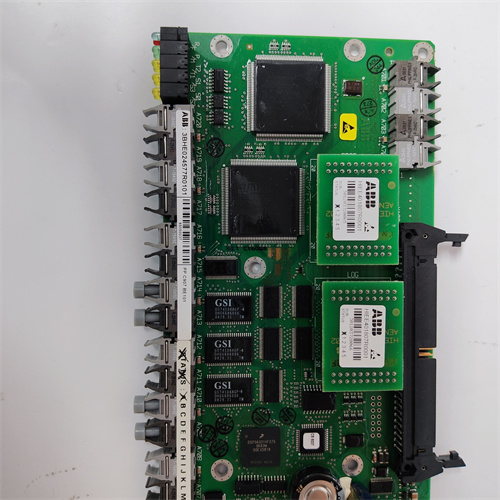
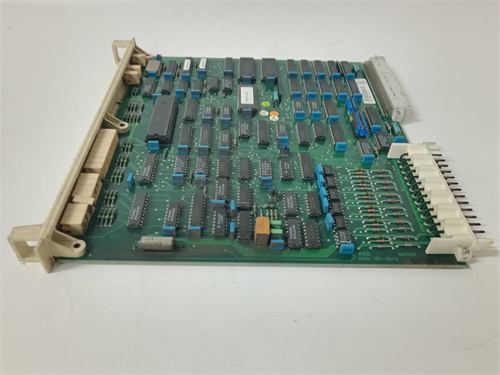
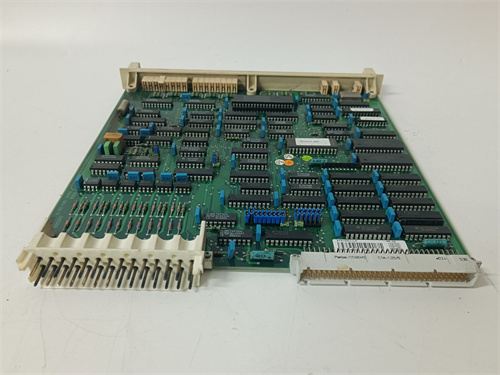
The ABB S100 system is old school—I’m talking 1980s/90s vintage—but there are still refineries, power plants, and paper mills running this gear 24/7. When you need to talk to those I/O racks from the control room, the DSCS131 is how you do it. It’s the communications module that sits in the S100 rack and handles MasterBus 300 traffic.
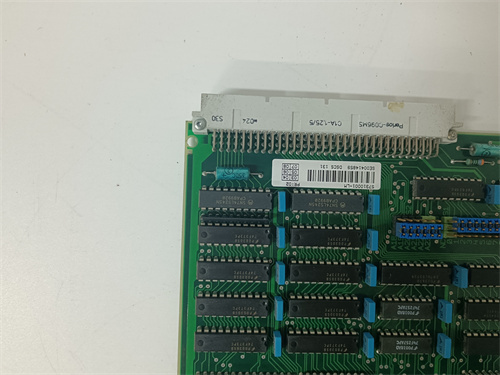
The DSCS131—full part number 57310001-LM—is the interface between the S100 I/O and the Master control system. It takes data from the I/O modules, packages it for the MasterBus 300 network, and sends it up to the controller. It also receives outputs from the controller and passes them down to the output modules. Without it, the S100 rack is just a bunch of isolated I/O with no connection to the outside world. In my experience, these modules are reliable but the fiber optic versions can get dirty connectors over time. Keep them clean.
Key Technical Specifications
| Parameter | Specification |
|---|---|
| Part Number | DSCS131 57310001-LM |
| Brand | ABB |
| Series | S100 / Master |
| Type | Communications Interface Module |
| Protocol | MasterBus 300 (proprietary ABB) |
| Physical Layer | Fiber optic or electrical (check variant) |
| Function | Interfaces S100 I/O rack to MasterBus 300 network |
| Data Rate | 2 Mbps typical (MasterBus 300 spec) |
| Rack Position | Typically leftmost slot in S100 rack |
| Indicators | Power, communication activity, fault LEDs |
| Power Supply | +5 V, +15 V, -15 V from backplane |
| Condition | New Original (New Surplus) |
Quality Inspection Process (SOP Transparency)
Incoming verification starts with the part number. DSCS131 57310001-LM is verified against OEM packing slip and module label. Serial number logged and checked against ABB’s format for S100 series.
Visual inspection:
- Case Condition: Inspected for cracks, damage, or signs of previous use. The metal case should be straight.
- Front Panel: LEDs checked for clarity. Fiber optic connectors (if equipped) inspected for damage, dirt, or scratches. Electrical connectors checked for bent pins.
- Connectors: Backplane connector inspected for bent pins or corrosion. Gold fingers should be pristine on new surplus.
- Label Integrity: Verify all labels present, including ABB logo and serial number.
Live functional test requires an S100 test rack with power supply and I/O modules.
- Power-Up: Insert module into rack (leftmost slot typically). Apply power. Verify power LED illuminates.
- Self-Test: Module should run internal self-test. After completion, “OK” or “Run” LED should illuminate steady. Fault LED remains off.
- Communication Test: Connect to MasterBus 300 network (test setup with Master controller or another DSCS131).
- Verify “Comm Active” LED flashes with traffic.
- Using diagnostic software (or scope on electrical variants), verify data packets present at expected rate.
- I/O Scan Test: With I/O modules in same rack, verify controller can read inputs and write outputs through DSCS131. All channels should update correctly.
- Redundancy Test (if applicable): Some systems use redundant DSCS131 modules. Test by disconnecting primary, verifying secondary takes over seamlessly.
- Fiber Optic Power Measurement (fiber variant): Using optical power meter, measure transmit power. Should be within ABB spec (typically -15 to -20 dBm).
- Thermal Run: 4-hour continuous operation with network traffic. Monitor case temperature via IR thermometer. Should stabilize below 55°C at 25°C ambient.
Final QC: Module sealed in anti-static bag with desiccant, QC Passed sticker with date and tech initials. Test report includes communication verification results—available on request.
Field Replacement Pitfalls
I’ve swapped DSCS131 modules in plants running S100 systems since before some of you were born. Here’s where the easy swap turns into a nightmare.
- ❗Fiber Optic Connector Contamination: The fiber optic versions are sensitive to dirt. If you install a new module with a dirty connector, you’ll get intermittent communication or no link at all. Inspect and clean fiber connectors before insertion. Use a proper fiber cleaner and scope—not your shirt.
- Node Address Configuration: The DSCS131 may have DIP switches or jumpers to set its network address. Photograph the old module’s switch settings before removal. Set the new module identically. Wrong address means the controller can’t find the rack.
- Bus Termination: MasterBus 300 is a bus topology. The ends need termination. If the DSCS131 is at the end of the bus, it may need termination enabled (switch/jumper). Check if the old module had termination and match it.
- Rack Position: The DSCS131 typically goes in the leftmost slot of the S100 rack. Some racks have specific slot requirements. Check the rack layout drawing before installation. Installing it in the wrong slot may work partially or not at all.
- Power Supply Check: The DSCS131 needs +5 V, +15 V, and -15 V from the backplane. If the rack’s power supply is failing, the module may act flaky—random resets, communication drops. Measure the voltages at the backplane before condemning the module. If the rails are out of spec, replace the power supply first.
- ❗Grounding: S100 systems are sensitive to ground loops. The rack must be properly grounded. If you’re replacing a module and the ground bond is poor, you’ll get random communication errors. Check chassis ground while you’re in the cabinet.
- Firmware Version: Different DSCS131 revisions may have different firmware. If your controller expects version X and the new module has version Y, you may get “Comm Mismatch” faults. Check firmware version on the old module (if readable) and verify the replacement matches.
- Cable Quality: MasterBus 300 electrical cables are old. If the cable insulation is cracking or connectors are corroded, replacing the module won’t fix the problem. Inspect cables while you’re swapping.
Get these eight right and you’ll cut rework time by 90%.
New Original vs. Refurbished: Why It Matters
A communications module is the lifeline between the I/O and the controller. If it fails, you lose visibility and control of whole sections of the plant. In an S100 system that’s been running for decades, reliability is everything.
What “New Original (New Surplus)” means for this DSCS131: This module left ABB’s factory, passed their final test, and never saw field installation. The communication transceivers haven’t been stressed by surges. The backplane connector shows no wear. The firmware is factory-stock. You get a traceable serial number that ABB can verify.
The refurbished reality: A refurbished DSCS131 came from somewhere—likely a decommissioned plant or a failed panel. Someone cleaned it, maybe replaced a visibly blown component, and tested basic power-up. What they can’t fix: aged electrolytics in the power supply section, communication transceivers damaged by previous surges, or fiber optic transmitters with degraded output. I’ve seen refurbished modules pass a bench test but fail in the field when connected to a real MasterBus network with long cables and noise. The failure rate? Conservatively 4-5x higher than new old stock.
The cost math: A communications failure in a running process:
- Loss of I/O means operators can’t see critical values
- Production may need to shut down for safety
- Troubleshooting time: 4-8 hours at $200/hour
- Lost production: $5,000-50,000 per hour depending on industry
A refurbished module that fails saves you maybe 300 upfront and costs you 20,000+ in downtime. The math is simple.
What we provide: You get a module that passes our full test protocol, including MasterBus communication verification. We photograph the OEM packaging if available. The serial number is logged and traceable. It’s sealed in anti-static with a QC Passed sticker.
Pricing context: Our price sits 30-50% above refurbished alternatives but 20-40% below current ABB list price (when available—these are legacy parts)—the delta covers global sourcing, our full test regime, and a 12-month warranty.
Performance Benchmarks & Test Results
These are measured values from our S100 test rack with MasterBus 300 network simulator.
- Power-On Self-Test: 15 seconds to operational state at 25°C.
- Communication Rate: 2 Mbps verified with no errors over 8-hour test.
- Packet Latency: < 2 ms typical from I/O scan to network transmission.
- Fiber Optic Output Power (fiber variant): -17.5 dBm at 850 nm (typical). Within ABB spec.
- Fiber Optic Receiver Sensitivity: Detects signals down to -25 dBm (better than required).
- Temperature Rise: After 4 hours at 25°C ambient, case temperature stabilizes at 48°C.
- Power Consumption: +5 V: 0.5 A, +15 V: 0.1 A, -15 V: 0.1 A (typical).
- MTBF: ABB design target for DSCS131 series: approximately 400,000 hours at 40°C ground fixed conditions. Refurbished units with aged components would be significantly lower.
PR6424/015-021 PLC
PR6424/016-100 PLC
PR6424/016-021 PLC
PR6424/103-021 PLC
 Email: sales@plcfcs.com
- Phone:+86 15343416922
- Wechat:+86 15343416922
 Wechat:+86 15343416922
PLC : Allen Bradley , Siemens MOORE, GE FANUC , Schneider
DCS : ABB ,Honeywell, Invensys Triconex , Foxboro , Ovation,YOKOGAWA, Woodword, HIMA
TSI : Triconex , HIMA , Bently Nevada , ICS Triplex
Complete service we offer
Payment: T/T
Delivery: 1-2 days
Shipment: DHL UPS FedEx, etc
After-sales service: Yes, 24/7 hours